Step Grouping
Step grouping lets you organize groups of commands within your Python protocols. This can be especially helpful when writing or working with long protocols. Beginning with API version 2.29, use commands to separate groups of steps:
- the context manager
group_steps(), which useswithsyntax. - the paired
create_and_start_step_group()andend_group()commands.
The examples on this page demonstrate using either method to create step groups that are visible in your Python protocol file, or in visualization in the Opentrons App.
Note
Step grouping doesn't affect the execution of your protocol. It's simply a way to organize writing and assessing your Python protocols.
The first example uses the context manager ProtocolContext.group_steps() to create a group of steps, contained inside a with block:
# create a step group for aspirating and dispensing steps

with protocol.group_steps(name="Aspirate and Dispense Buffer", description="Transfer liquid from reservoir to well plate"):
    pipette.pick_up_tip()
    pipette.transfer(
        volume=50,
        source=reservoir['A1'].bottom(z=1),
        dest=plate['A1']
    )
    pipette.drop_tip
Each command you add inside the with block becomes a part of the step group.
The second example uses the create_and_start_step_group() command to create a group of steps. Because this command isn't a context manager, you'll need to include the end_step_group() command to close your step group.
## create a step group for aspirating and dispensing steps

step_group_1 = protocol.create_and_start_step_group(
    name="Aspirate and Dispense Buffer",
    description="Transfer liquid from reservoir to well plate")

pipette.pick_up_tip()
pipette.transfer(
        volume=50,
        source=reservoir['A1'].bottom(z=1),
        dest=plate['A1']
    )
pipette.drop_tip

step_group_1.end_group()
Step groups can organize a protocol with hundreds of commands into a handful of easily readable groups. This makes a long Python protocol easier to understand, whether in your preferred code editor or in protocol visualization.
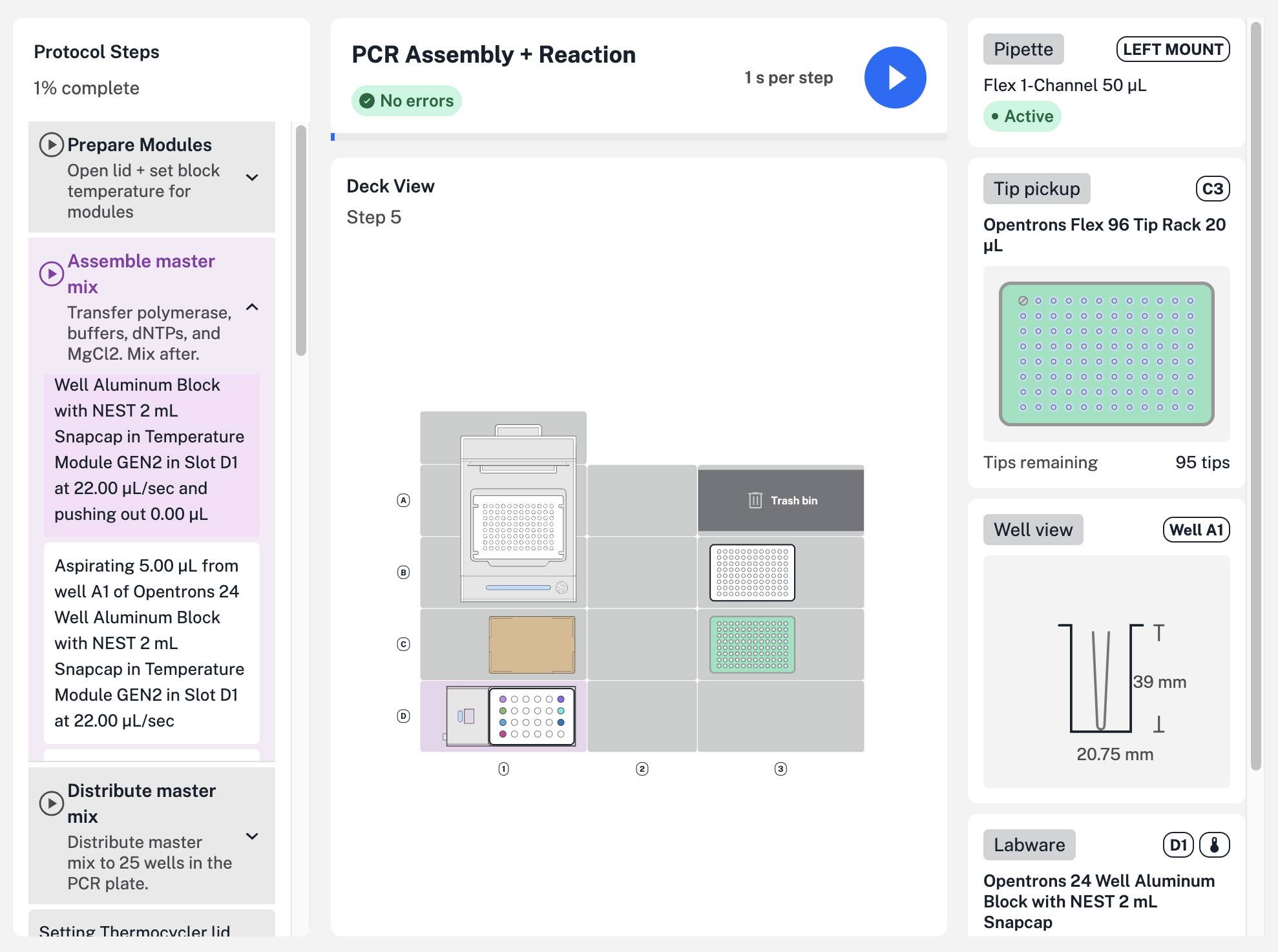
Click Visualize in a Flex protocol's details page to get started. In the example above, three groups combine related steps, like transferring all the required reagents to assemble a PCR master mix. Use either method's optional name and description parameters to provide a name (like "Assemble master mix") and description, which appear in protocol visualization.